Blog Posts and Workshops

Recently, AWS announced support for using IAM roles with image builders and fleets. Now, Amazon AppStream 2.0 streaming instances can take advantage of the flexibility and security of role-based access to AWS API actions.
One useful application of this feature is easily uploading and storing Windows Event logs for troubleshooting. Because of the ephemeral and managed nature of the AppStream 2.0 streaming instances, Windows Event logs are not automatically captured and stored in a meaningful way.
The recently released Amazon Kinesis Agent for Microsoft Windows version 1.1.202.1 introduced support for AppStream 2.0’s AWS Identity and Access Management Role assertion. Besides Amazon Kinesis Data Stream and Amazon Kinesis Data Firehose, the Kinesis Agent for Microsoft Windows supports uploading to Amazon CloudWatch Logs. Using this, with an AppStream 2.0 session start script, it is possible to store log data in an easily searchable form for troubleshooting or auditing.
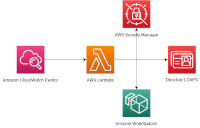
Many companies that have adopted Amazon WorkSpaces seek out ways to provision desktops for their users efficiently. In this blog, I will show you how to build a serverless solution that uses directory group membership to automate WorkSpaces provisioning and de-provisioning using AWS Lambda. This allows companies to use their existing directory group approval workflows to provision WorkSpaces.
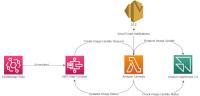
Amazon AppStream 2.0 has released the Managed Image updates feature. This feature applies the AppStream 2.0 component and Windows updates to your existing AppStream 2.0 images with a single operation. Our previous blog covers the feature details. Customers ask, how can we schedule this?
In this blog, we describe how to schedule your AppStream 2.0 image updates, and apply them in batches.
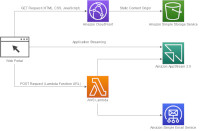
Create a web portal for a reference corporation, Example Corp. This example corporation lets interested customers create an account and sign up for an online software trial.
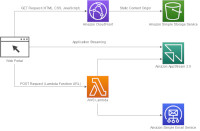
Create a web portal for a reference corporation, Example Corp. This portal lets you share a preconfigured Amazon AppStream 2.0 image with your customers, if they sign up to access the image.
Create a software as a service (SaaS) portal for a reference corporation, Example Corp. This example corporation lets interested customers create an account and sign up for a web-based software subscription.
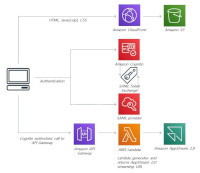
The Amazon AppStream 2.0 team released a workshop aimed at helping independent software vendors (ISV) move their Windows applications to a software as a service (SaaS) model. Some ISVs have reported that their customers would like to use their own identity provider with the SaaS to provide easier access to a large user base. This blog provides instructions for providing setting up integration with a SAML identity provider (IdP) using the workshop SaaS portal as a starting point.
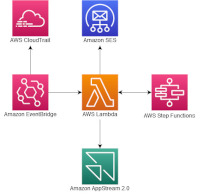
In a previous blog, we looked at how to schedule managed image updates for Amazon AppStream 2.0 using AWS serverless services. In this blog, we describe how to automate the deployment of AppStream 2.0 images to existing fleets. By creating the automated deployment workflow, we can schedule the update of the fleets during off hours, or at a scheduled time. This automation reduces the maintenance overhead, and end-user impact to updates.
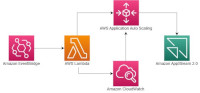
This blog post walks you through creating an event driven solution with AWS Lambda to change your AppStream 2.0 auto scaling policy based on time of day.
With Amazon AppStream 2.0’s Fleet Auto Scaling capabilities you can adjust the size of your AppStream 2.0 fleet automatically to match user demand. However, with certain usage patterns, using the same application auto scaling step sizes all the time causes the launch of unnecessary resources. For example, off hours usage may not require the same number of instances to be added per scaling action as your peak hours policy specifies.
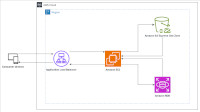
In this blog, we look at how Aura took advantage of S3 Express One Zone’s consistent low latency storage to decrease peak load on its core Amazon Relational Database Service (Amazon RDS) cluster. First, we look at the challenge Aura faced supporting the holiday rush, where single day traffic can reach 20x the usual number of signups and 9x the usual number of photo uploads. Then, we discuss how Aura used S3 Express One Zone to reduce peak database load, ensuring users have a fast and smooth setup and image upload process for their new frames.